GIF Fun 3 LZW Edition
A milestone in my GIF editor, and something I first had left as a problem for future me, was the compression and decompression of images. Because of the way that GIFs work, a lot of information is easily manipulable; changing colors or reordering images in general was not a hard thing, so I simply saw no need to actually implement the LZW algorithm that GIFs use early on. But eventually the need to display images and also me wanting to actually change colors of specific pixels was there, and so I had to read and understand how one of the more important parts of GIFs works
This installment of the GIF series is going to be a smallish tutorial on how LZW works in general, what GIFs do with it, and then a glimpse into how I implemented it in a dumb but, for me, understandable way.
LZW (in general)
LZW is a dictionary-based compression method, meaning that it uses a dictionary that resolves code numbers to symbol sequences like "aaba" or "01100" and uses these code numbers instead of the long sequences. Then, once the dictionary was used to compress something, someone else can take the same dictionary and reverse the process, looking up each encountered number and replacing it with the original sequence. As we will see for LZW, the dictionary can change during the (de-)compression procedure, but at every step it is going to be clear which code number maps to which sequence.
This way of compressing things is, generally speaking, lossless; the original data can be restored without any pieces missing, artefacts, or errors (not accounting for data corruption). However, there are also downsides with regard to aspects like compression efficiency because of the need for a dictionary and how it is built. LZW is interesting because the algorithm for compression and decompression builds the dictionary during its runtime, starting only with a handful of symbols and adding new entries at specific points, which we will see in the coming subsections. This means that LZW does not need to transfer a full dictionary along with the compressed data.
Another thing that makes LZW rather nice to implement is that it only goes over each part of the input once; no backtracking or multiple passes are needed. In terms of efficiency, LZW is, well, good enough for GIFs, but since its development, many more methods of compression have come around, and today it would likely not be anyone's first choice. But that is okay; it is still interesting and thankfully simple enough for someone like me to implement without needing a PhD in quantum physics.
Compression
Because it is the easier of the two cases, we start with compression, the part of LZW that takes a long input and produces a smaller output, which then later can be decompressed again. The basic idea is this: Start with a dictionary that holds all atomic symbols (for a GIF, this would be the indices of the used color table), then loop over the input. While looping, build sequences of the partial input seen so far and check if they are in the dictionary; if they are, continue; if not, add them to the dictionary and write the last part of the sequence that was in the dictionary to the output, then keep the last element of the sequence as the start of the next sequence and continue.
With this, a new entry for the dictionary is added every time the algorithm writes something to the output, and the way it builds up the sequences leads to the smaller ones being prefixes of the longer ones (i.e. if 'aab' is added to the dictionary, then it already contains 'aa').
Here is the algorithm in pseudocode (taken from Wikipedia):
1 Initialize the dictionary to contain all atomic symbols
2 Find the longest sequence W in the dictionary that matches a prefix of the current input.
3 Emit the dictionary index for W to output and remove W from the input.
4 Add W followed by the next symbol in the input to the dictionary.
5 Go to Step 2.
The Wikipedia version does the loop by removing parts of the input instead of sliding over it, but hopefully you can see how it is functionally the same procedure as described before.
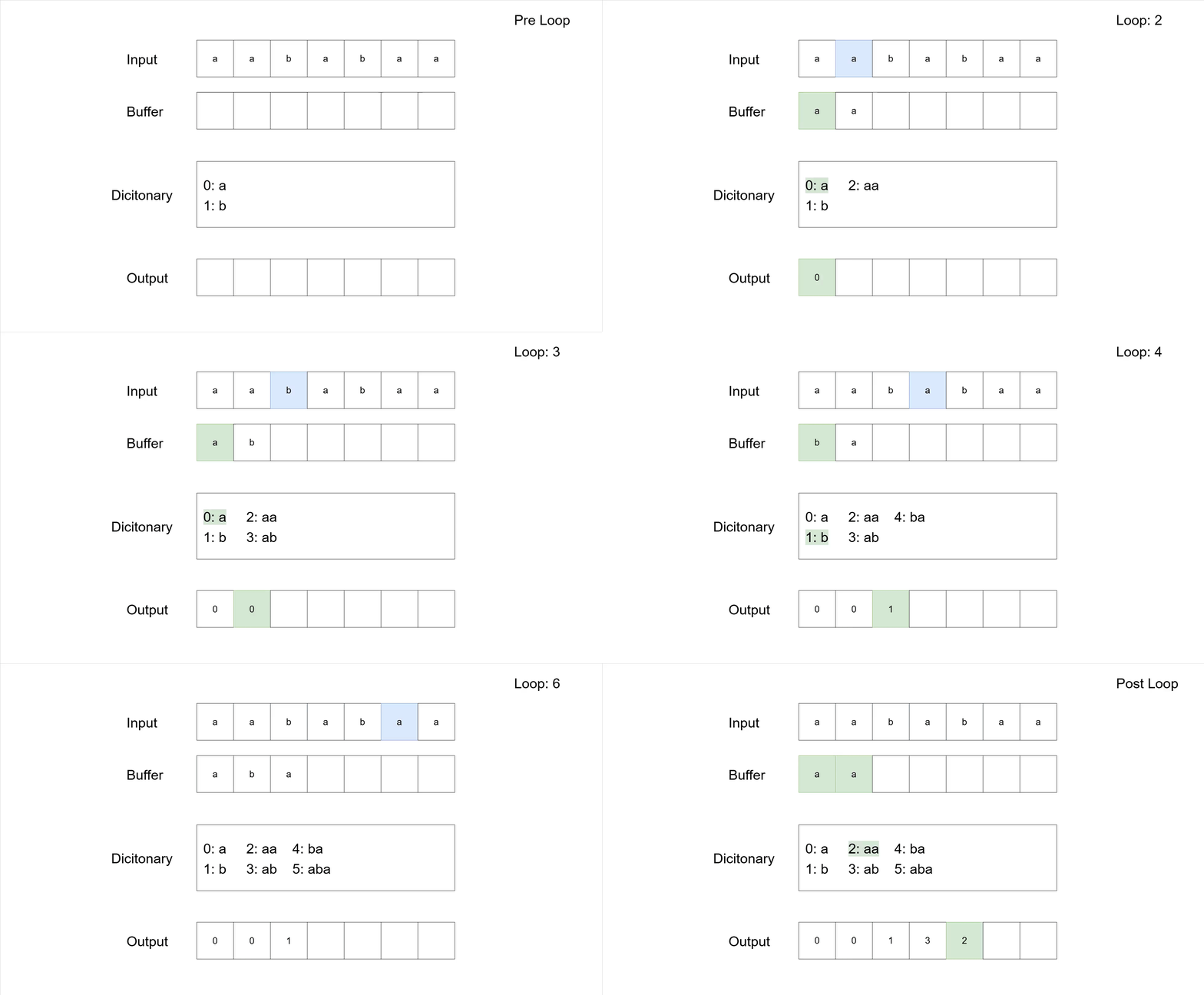
To make the process a bit clearer, let us look at the compression of the sequence 'aababaa'. The following table shows the general steps according to the pseudocode. The actual compression is not so great (input has 7 symbols and the compressed output has 5), which is typical for LZW on small sequences. Furthermore, there are codes added to the dictionary that are never used for compression; that is simply a by-product of the algorithm adding entries before actually using them.
| Rest Input | W | Dicitonary | Output | Note |
|---|---|---|---|---|
| aababaa | 0: a 1: b | Initialization | ||
| aababaa | a | 1. loop | ||
| ababaa | a | 0 | ||
| ababaa | a | 2: aa | 0 | W + next input symbol = aa |
| ababaa | a | 0 | 2. loop | |
| babaa | a | 00 | ||
| babaa | a | 3: ab | 00 | |
| babaa | b | 00 | 3. loop | |
| abaa | b | 001 | ||
| abaa | b | 4: ba | 001 | |
| abaa | ab | 001 | 4. loop | |
| aa | ab | 0013 | ||
| aa | ab | 5: aba | 0013 | |
| aa | aa | 0013 | 5. loop | |
| aa | aa | 00132 | W is the whole input | |
| - | - | 0: a 1: b 2: aa 3: ab 4: ba 5: aba | 00132 | Final dictionary and output |
And of course, here is the same process, step-by-step, as a GIF.
Decompression
Because the first symbol in the given data is never compressed, the decompressor can start building the exact same dictionary as the compressor did. The decompressor reads each code number, looks it up in the dictionary, and emits the corresponding sequence. The next dictionary entry is then simply whatever the last sequence emitted was plus the first symbol of the currently emitted sequence added at the end. The decompressor is basically recreating the sequences the compressor saw whenever it emitted their code numbers, but it is one step behind the compressor. This leads to a special case where the decompressor encounters a code number too early.
When a sequence starts and ends with the same symbol, it can happen that the decompressor encounters its code number before it was written into the dictionary. This happens if the same sequence occurs twice and overlaps with itself; then the compressor would have written the code for that sequence into its dictionary and used it as the next output, but because the decompressor is one step behind, it has not been able to add the same code to its dictionary before it encounters it.
For example, with "aaa" as input, the subsequence "aa" occurs twice with a self-overlap and would be the first new entry of the compressor into its dictionary; that entry would then be the next thing written to the output. But a decompressor would not have yet added "aa" to its dictionary.
Thankfully this is the only possible case, so the decompressor can deal with it by taking the last sequence it has decoded (in the example this would be "a") and adding the first symbol of that sequence to the end of the sequence, resulting in the new dictionary entry needed ("aa" for the example).
Like with the compressor, here is the decompressor in pseudocode (again taken from Wikipedia).
1 Initialize the dictionary to contain all atomic symbols.
2 Read the next symbol from input
3 If the symbol is not encoded in the dictionary, goto step 7.
4 Emit the corresponding sequence W to output.
5 Concatenate the previous sequence emitted to output with the first symbol of W; add this to the dictionary.
6 Go to step 9.
7 Concatenate the previous sequence emitted to output with its first symbol; call this sequence V.
8 Add V to the dictionary and emit V to output.
9 Repeat step 2 until end of input.
The pseudocode shows the handling of the special case, but besides that, it is straightforward. Line 5 is the adding of regular new dictionary entries and highlights the 'one step behind' nature of the decompressor due to the need for previous sequences having been decoded. The pseudocode doesn't state it explicitly, but for the very first entry the decompressor handles, it does not add anything to the dictionary, as there has not been a previous sequence to draw upon.
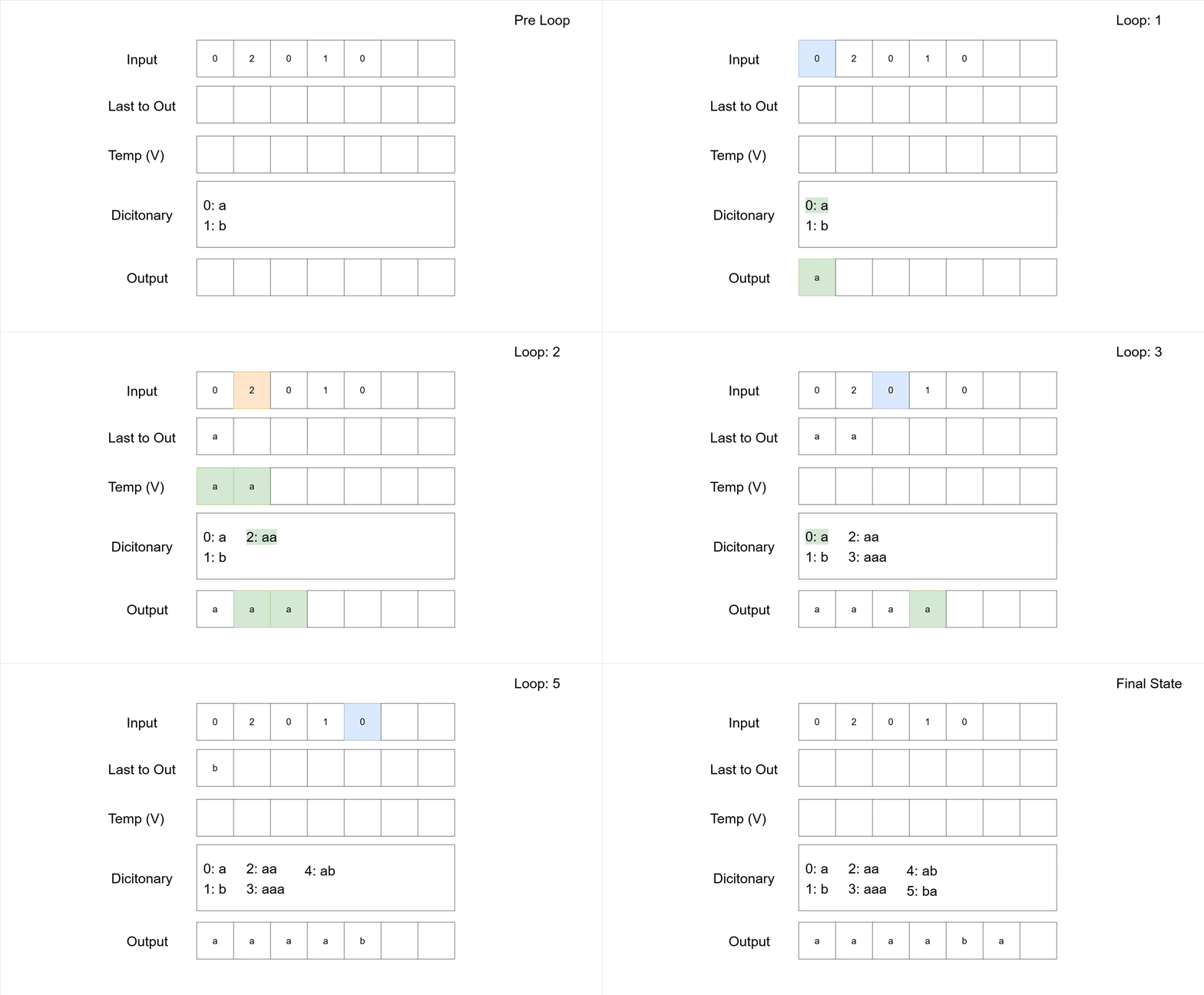
Analogous to the compression, the following table shows the decompression of the sequence '02010' with the same base symbols as we used for the compression example.
| Rest Input | Next Symbol | V | Dicitonary | Output | Last added | Note |
|---|---|---|---|---|---|---|
| 02010 | 0 | 0: a 1: b | - | Initialization | ||
| 2010 | a | a | no dictionary entry added | |||
| 2010 | 2 | '2' not in dictionary | ||||
| 010 | aa | 2: aa | aaa | aa | concatenate 'a' with 'a' for V | |
| 010 | 0 | |||||
| 10 | 3: aaa | aaaa | a | |||
| 10 | 1 | |||||
| 0 | 4: ab | aaaab | b | |||
| 0 | 0 | |||||
| 5: ba | aaaaba | a | ||||
| 0: a 1: b 2: aa 3:aaa 4: ab 5:ba | aaaaba | Dictionary + Output |
And here is the same decompression as a GIF.
More LZW (now even for GIFs)
Now that we have seen how compression and decompression work in general, we can look at the rest of LZW and some GIF-specific things. First off, there is a maximum code size; after all, the bigger the number we need to save for dictionary entries, the more memory we are going to take up per number, and especially back in 1984, you did not want to have them get too big.
For that reason, the highest code number you can have in your dictionary is 4095 for a total of 4096 allowed entries (from 0 up to 4095), so you can use up to 12 bits. The "up to" here is important, as we will see in a bit. This maximum of dictionary entries also implies that there is a point at which the dictionary is full. However, it might be better for the compression if new entries are allowed; depending on the data, the current dictionary might not have the best sequences for further compression. For that purpose there is a special code number used that signals that the dictionary should be set back to the original state; this clear code for a GIF image is equal to 2 to the power of the minimum code size used for the image. After the reset, compression and decompression continue just like they would on a fresh input.
When to write the clear code is up to the compressor, and thus this is one of the main ways that one can try to make the compression more efficient. For example, an image consisting of a single color would best be compressed by keeping the first built dictionary and never resetting it.
Besides the reset code, there is the end-of-data code, which signals the end of the compressed data. It gets the code number immediately following the clear code. In theory a GIF image can have data beyond the end-of-data code, but a decompressor should ignore it. Due to these two special codes, the actual first code number for new dictionary entries is the end of data code number plus 1.
LZW also uses variable-width codes and bit-packing to further compress the data. While we can use 12 bits for the code numbers, we won't be needing that many when we start the (de-) compression. In fact, we only would need the full 12 bit after already having 2048 entries in the dictionary; every entry before that needs at most 11 bit to be represented.
The number of bits for the code size simply follows the maximal needed amount of bits to store the next biggest code number in the dictionary. Of course, whenever a clear code is written/read to reset the dictionary, the number of bits used for storage also are reset to fit the fresh dictionary.
Bit packing now means that these variable-width codes outputted are simply smushed together instead of somehow kept around as integers; they are packed back-to-back into the resulting output. That means that any implementation will have to deal with bit-shifting quite a lot whenever new codes are written/read to/from the output. Because, of course, the data in the end needs to fit into bytes; if the amount of bits does not neatly fit into a multiple of 8, they simply are padded with 0s at the end.
Notes on my (dumb) implementation
The last thing for this post: some quick notes on my implementation for the compression and decompression algorithm.
I had done a basic first implementation in C++ before switching to TypeScript, and while doing the switch, I caught some bugs I had missed the first time around, like not entering the last possible code number to the dictionary in the decompression because I stopped growing the dictionary at this point and forgot to add that last code to it.
To handle the bit-packing and unpacking, I decided to make separate classes, which honestly is too much but made it easier for me to think about what was happening when a new code was added in terms of filling up bytes and storing them. For the packing part, it was important that there be an end signal after which no further writing was possible because of padding. For the unpacking part, it was enough to look for an end-of-data code and stop there, so any padded 0s were no problem to deal with.
Really the bit-packing was not hard to implement, except for maybe the bit-shifting and bit-masks, which I had never done in TypeScript. In a more efficient implementation, you would probably forgo the decoupling into two more classes, simply have the (un)packing operations be part of the (de)compression instead, and not do any in-between storing.
The main part that got me was the actual compression and especially the decompression. A big potential source for problems (especially runtime ones) is how one handles the dictionary in both cases. A naïve approach might be to use a map. At least for the decompression, it makes sense to simply map a code onto the sequence it represents. For the compression, it is a bit more finicky, as mapping sequences onto codes in a direct fashion is neither optimal nor necessarily possible. Something akin to Map<Vector<uint16>, uint16> is not going to work, so I needed a better approach with some deeper structure.
The data structure I ended up using is a Trie, which is a tree that stores prefix sequences. If we think about the entries in our dictionary, we can easily see that if an entry like 'aba' exists, then so does the entry 'ab' and, of course, the entry 'a'. For the compressor I could easily use this structure; traversing the Trie along the input, and every time the next symbol is read from the input, simply go to the corresponding child.
If no child exists, then this is the case where the encoder needs to add a new entry into the dictionary, which works by simply adding a new child to the Trie. The initial symbols/entries in the dictionary are simply the root's direct children; the root of the Trie itself is otherwise pretty useless.
A great thing about the Trie is that we can also use it to get the sequence corresponding to a code number. Simply walk down from the root to the child node that corresponds to the entry's code number; that path is the sequence. In practice for the decompression, I used a map from numbers to Trie nodes, which allowed the return of a sequence without having to search through the Trie every time. The Trie still made storing the sequences more efficient than mapping numbers to strings or similar.
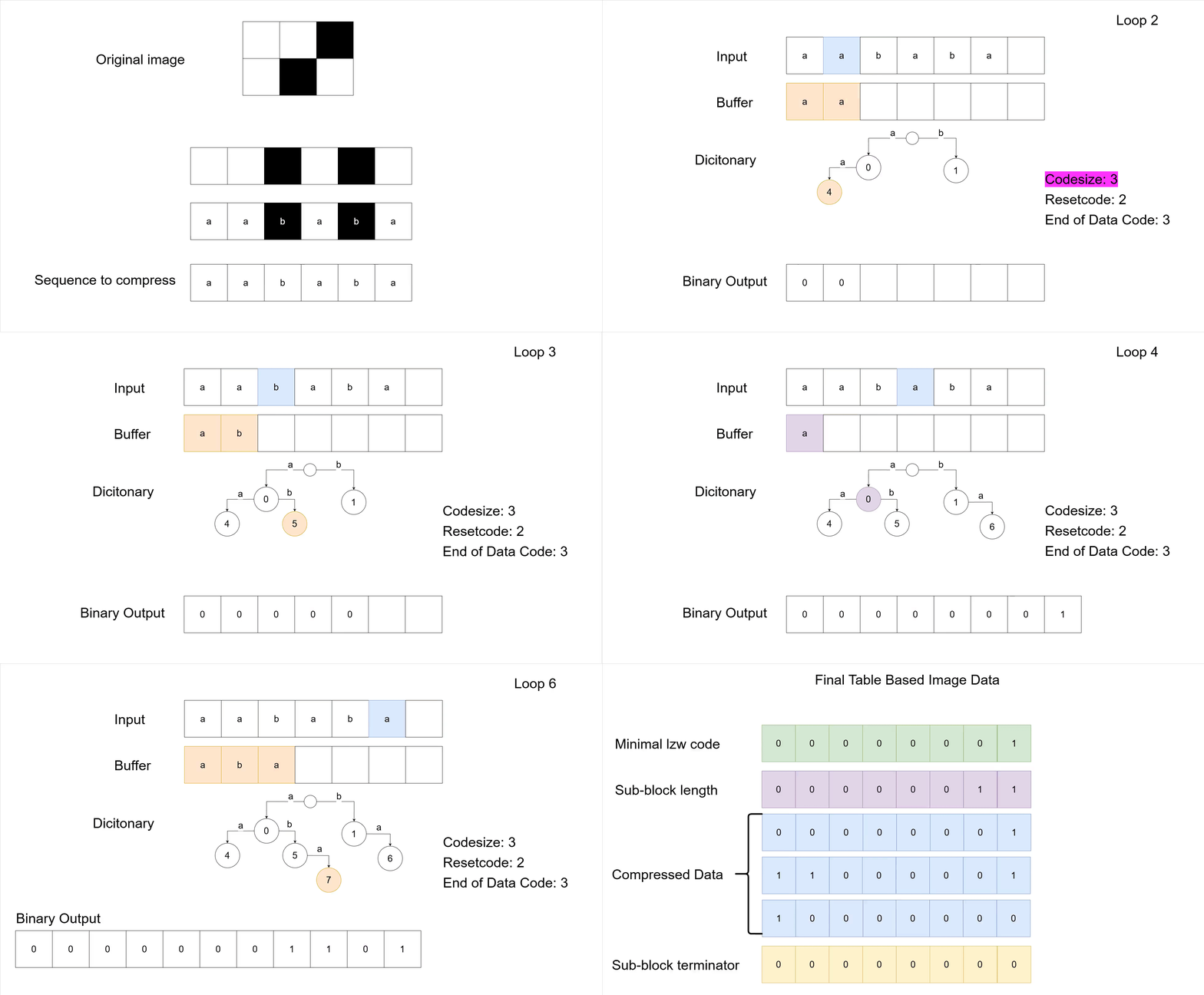
Now with all of this information, we can finally look at a full compression example of a 6 by 2 pixels image. It starts with the original image, and ends with the how the data would appear inside the GIF. Note the Trie which has replaced the direct dictionary maps from the earlier examples.
There is very likely a smarter way to implement all of this: better data structures, cleaner code, clearly better programming languages, etc. But it works. I managed to write the code starting from the specification and the few good online resources (which I also linked in the editor's info page), and that is good enough for me.
And that is all for this post. Thank you for reading.